Best Apps for Habit Tracking: A Complete Guide
Discover effective apps for habit tracking, focusing on ThrivePal's unique features and actionable strategies for lasting change.
Understanding the Benefits of Habit Tracking Apps
Habit tracking apps can significantly enhance your journey toward personal development. Here are a few key benefits:
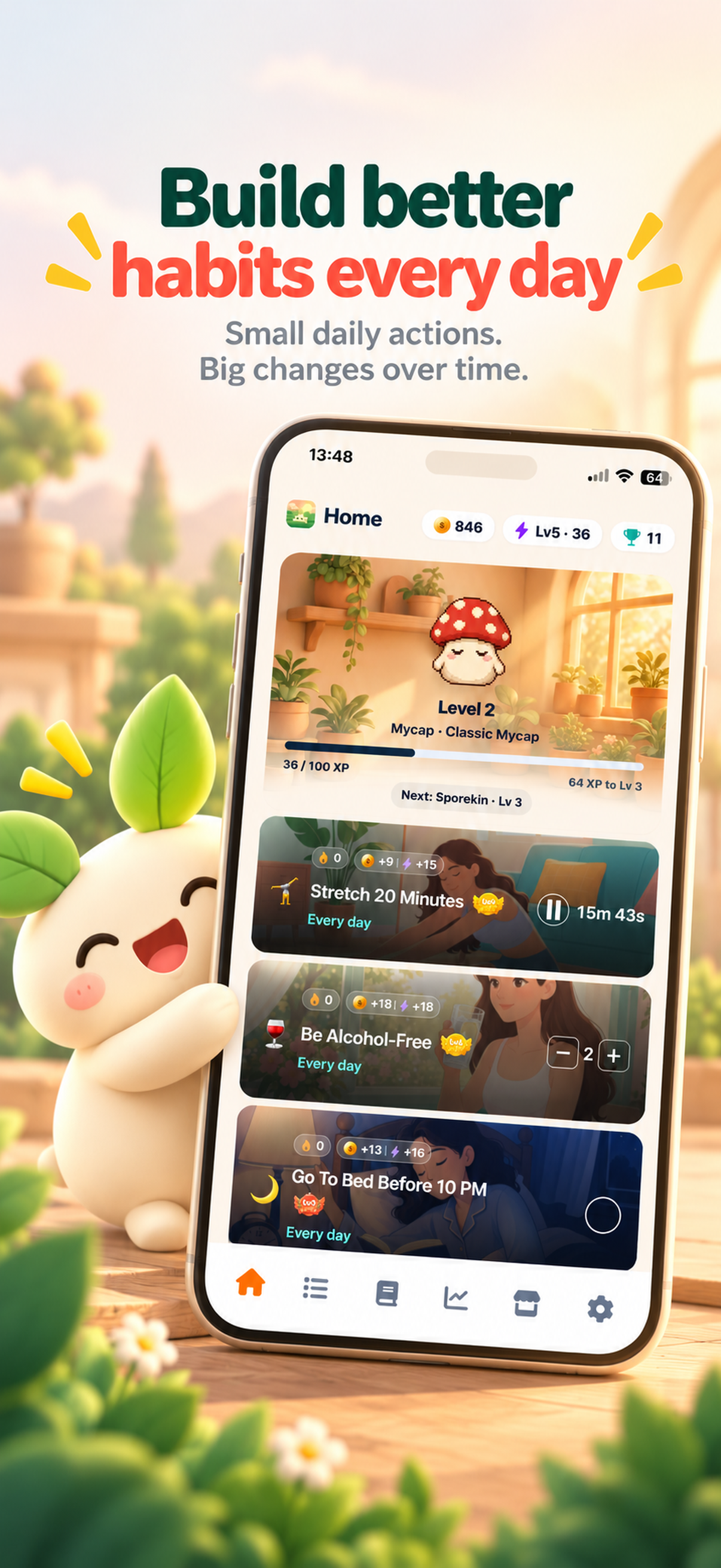
- Improve Accountability and Consistency: Habit tracking encourages accountability by allowing you to visually represent your progress. Seeing the days where you’ve completed your habits boosts motivation and reinforces your commitment.
- Track Multiple Aspects of Life with Varied Habits: Most apps allow you to monitor habits across different life areas—such as health, productivity, and well-being—providing a holistic view of your lifestyle choices, making it easier to adjust accordingly.
- Use Rewards and Gamification for Motivation: Many apps employ gamification, turning habit tracking into a rewarding experience. Completing habits can earn you points or rewards, which can serve as strong motivation to stick with them.
Concrete Example: ThrivePal includes a checklist of 54 habits categorized into 10 life areas: sleep, movement, strength, nutrition, mindfulness, focus, digital habits, relationships, everyday life, and quitting. By browsing these habits, users can easily pick specific areas to focus on in their lives.
Why ThrivePal Stands Out Among Habit Tracker Apps
When comparing different habit trackers, several unique features make ThrivePal a strong contender:
- Free to Download with Optional Features: ThrivePal is accessible to everyone because it’s free to download and use, enabling you to explore the app’s features without any financial commitment.
- Incorporates a Gamified Experience via Virtual Companions: Users grow a virtual companion as they complete habits and reach milestones, providing motivation through an engaging and playful experience.
- Allows Users to Check Off Habits by Counting, Timing, or Logging: ThrivePal offers flexibility in how you track progress, enhancing usability by accommodating various tracking styles.
Sample User Journey: As users progress, they can move from a Level 1 habit—like walking for 10 minutes—to higher levels when it feels manageable, facilitating gradual increases in challenge.
Getting Started with ThrivePal: Onboarding and Customization
Successfully getting started with ThrivePal involves tailoring the experience to fit your needs. Here’s how:
- Quick Onboarding to Tailor Habit Suggestions: After installation, you answer a few straightforward questions about your goals and interests. ThrivePal then suggests a list of starter habits that are relevant to your lifestyle.
- Creating Your Starter Set with Personal Goals: Choose a selection of 3-5 habits from the suggestions to create your starter set. Focusing on a manageable number will help you build consistency.
- Using the Mood Journal to Connect Habits and Emotions: Utilize the app’s mood journal feature to reflect on how your habits affect your emotional state and overall well-being, encouraging personal insights and adjustments.
Example Onboarding Flow: Users answer questions about their lifestyle and select 5 starter habits across different life areas, ensuring a well-rounded habit formation process.
Tracking Your Progress Effectively
Monitoring your progress is vital to habit formation and sustaining motivation. Here are features in ThrivePal that facilitate effective tracking:
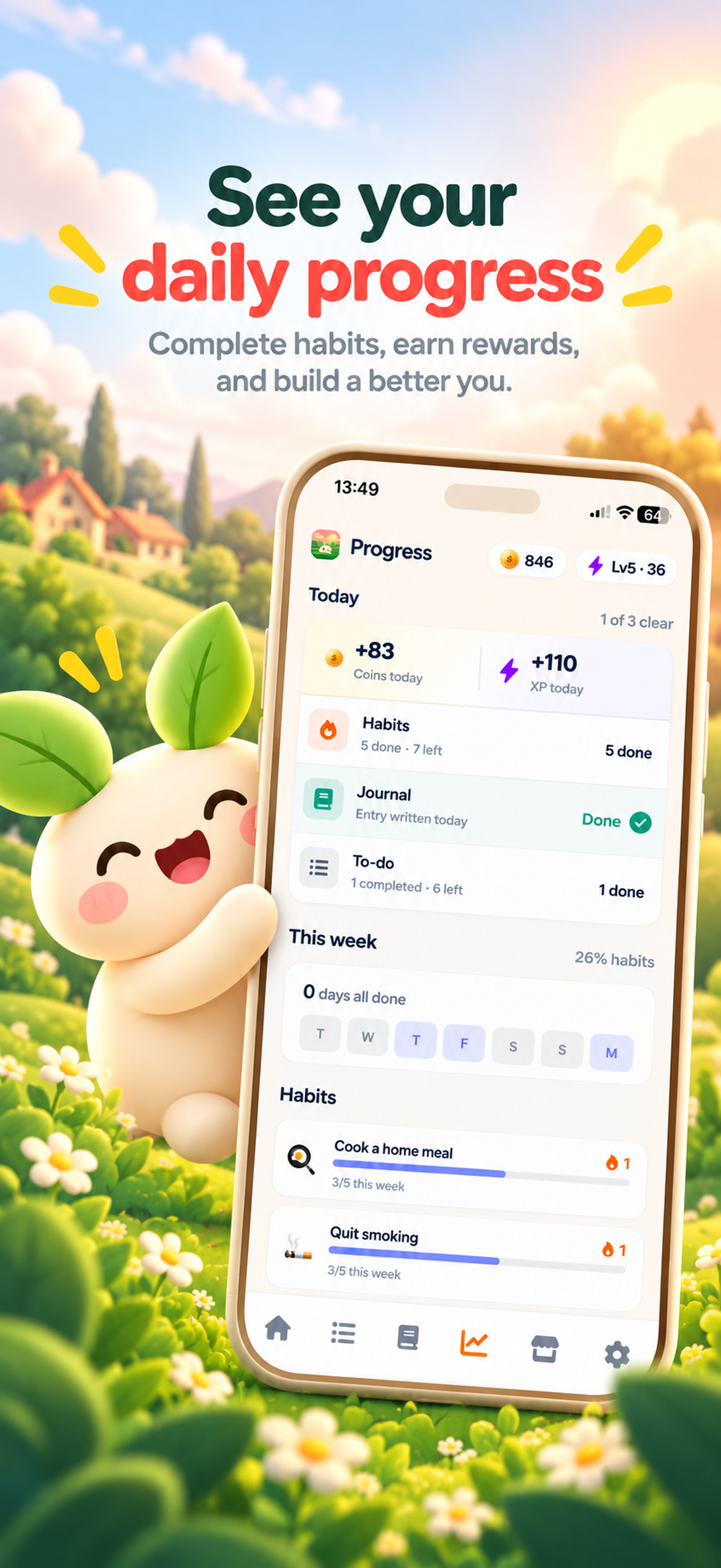
- Daily Progress Maps Showing Achievements and Streaks: Users can visualize their progress on daily maps that showcase how many habits they’ve completed and their streaks, providing clear motivation to keep going.
- Utilize Reminders to Maintain Consistency: Set reminders for your habit tasks to ensure you don’t forget, helping you establish a routine in your busy life.
- Encouragement to Reflect via Journal Entries: ThrivePal prompts users to reflect on their daily achievements through journal entries, encouraging mindfulness and self-assessment.
Artifact: Here is a daily tracker template that users can fill out, focusing on 3 habits each day:
- Habit 1: Check-off, count, or time.
- Habit 2: Check-off, count, or time.
- Habit 3: Check-off, count, or time.
Incorporating Rewards and Achievements
Rewards can significantly enhance your commitment to habit tracking. ThrivePal provides several engaging rewards:
- Explaining the Coin System and Unlocking Features: Users earn coins for completing habits, journal entries, and to-do tasks, allowing them to unlock new features or buy items within the app.
- Earning Badges for Streaks and Habit Milestones: Achievements such as maintaining a streak trigger the awarding of badges, motivating users to stay on track.
- Building a Connection Between Habits and Virtual Pet Growth: As users complete tasks, their virtual companion grows and can gain new outfits and forms, introducing a playful element to tracking.
Artifact: Here is a sample reward plan with tiered badges users can aim for over 30 days:
- Complete 7 consecutive days to earn Bronze Badge.
- Complete 14 consecutive days to earn Silver Badge.
- Complete 30 consecutive days for a Gold Badge.
Best Practices for Habit Formation Using ThrivePal
Fostering good habits involves specific practices to ensure success. Here are effective strategies:
- Start with Level 1 Habits to Find Your Routine: Begin with the smallest version of a habit to build confidence and routine without overwhelming yourself.
- Employ Habit-Stacking to Integrate Newer Habits with Existing Ones: Pair a new habit with one you already have. This can be as simple as meditating for 3 minutes after brushing your teeth.
- Regular Review of Progress to Adjust Habits as Needed: Frequent assessments can help you decide whether to scale up, adjust, or replace habits that aren’t resonating.
Artifact: Here’s a checklist of habit-stacking examples tailored for ThrivePal, such as:
- After I brush my teeth, I will meditate for 3 minutes.
- After I pack my lunch, I will drink a glass of water.
- After I sit at my desk, I will write my three tasks for the day.
Exploring Different Habit Areas: Tailoring ThrivePal for You
ThrivePal supports habit tracking across several crucial areas, allowing for personal focus and targeted improvements:
- Focus Areas: Users can select from sleep, movement, strength, nutrition, mindfulness, focus, digital habits, relationships, everyday life, and quitting. This breadth ensures that whether you’re looking to improve your physical health or mental wellbeing, there’s a habit area for you.
- Personalize Your Habit Tracker Based on Specific Goals: By focusing on particular areas most relevant to your life, you can create a habit tracker tailored to your individual growth journey.
- Experiment with Different Habit Tracking Techniques for Each Life Area: Try different methods of tracking or types of habits for various areas to see which techniques resonate most.
Artifact: Here’s a 7-day personalized habit tracker plan focusing on one area each day:
- Day 1 (Monday): Movement - Walk for 10 minutes after lunch.
- Day 2 (Tuesday): Mindfulness - Meditate for 3 minutes.
- Day 3 (Wednesday): Nutrition - Drink 4 glasses of water.
- Day 4 (Thursday): Strength - Do 2 push-ups.
- Day 5 (Friday): Relationships - Call a friend.
- Day 6 (Saturday): Digital Habits - Limit social media to under 3 hours.
- Day 7 (Sunday): Everyday Life - Declutter one area in your home.
FAQ
What are the essential features of a habit tracking app?
The essential features include tracking options (checking off, counting, timing), reminders, progress visualization, achievements, and user-friendly onboarding customizations.
How do I choose the right habits to track?
Start with small, manageable habits that resonate personally with you. Focus on 2-3 habits at a time from different life areas for a well-rounded approach.
Can habit tracking apps help with bad habits?
Yes, many habit tracking apps help monitor and replace bad habits by tracking both the negative behavior and a productive replacement.
How do rewards in habit tracker apps enhance commitment?
Rewards create motivation and positive reinforcement, encouraging users to repeat behaviors that lead to those rewards.
What levels of habits should I start with?
Start with Level 1 habits, which are small and easy actions to build consistency before progressively increasing their difficulty.
Are there community features in habit tracking apps?
Many habit tracking apps focus more on personal tracking rather than community features, although some may offer social sharing or challenges for additional motivation.